Showing posts with label GIS4043. Show all posts

Wednesday, December 13, 2017

INTRO GIS4043 - Final Project - Bobwhite-Manatee Transmission Line

"Transmission line buffer corridors or buffer zones are the area below, and around,
transmission lines in which activities and land uses that are incompatible with the safe and
efficient operation of the national electricity transmission network are avoided."
             -Sep. 2012, "Q&A: Transmission Line Buffer Corridors", Transpower

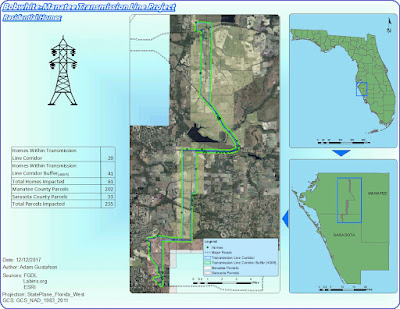
For the GIS4043 Intro to GIS lab final project we were tasked with creating 5 impact maps that assess the following proposed conditions regarding the installation of the Bobwhite Transmission Line, that runs from Manatee county, Florida to Sarasota county, Florida.  
-It has relatively few homes in close proximity.
-It generally avoids schools and school sites.
-It avoids large areas of environmentally sensitive lands.
          Conservation lands and wetlands.
-The line can be built along this route for a reasonable cost. 


The Bobwhite-Manatee Transmission Line Project was completed only after applying             multiple skills learned and mastered through study and persistence in Arcmaps. Not only       were the 5 presented maps assessed for but also an array of design elements were considered in the construction of this impact report. 

This semesters introduction to GIS has proven to be one of the most beneficial and creative expressive classes I've ever taken. I personally have enjoyed learning an array of GIS skills that I plan to carry on with me in to not only future GIS courses but all projects that are environmental science related. 

Power Point Presentation - http://students.uwf.edu/atg6/GIS/BWMTLP_powerpoint.pptx

Slide by Slide Script - http://students.uwf.edu/atg6/GIS/BWMTLP_slidebyslide.pdf


Tuesday, November 21, 2017

INTRO GIS4043 - Lab 12 Georeferencing, Editing and Arcscene

Reference - use of a source of information in order to ascertain something
-Dictionary.com 

In this weeks lab we were tasked with georeferencing a dataset of the buildings on UWF campus with an aerial imagery raster file of the UWF campus. This involved adding multiple control points to reference the unknown raster image to the UWF building feature class. We were then tasked with creating an inset map of a nearby protected eagle nest and create a compound buffer consisting of a 330 foot ring and 660 foot ring around the eagle nest point. I then added another inset to reference where the eagle nest is in relation to the globe. Our second map deliverable involved utilizing Arcscene to recreate the UWF buildings feature class layer in a 3d environment. Building 072 and Campus Lane were highlighted to show created digitized features.


Thursday, November 16, 2017

INTRO GIS4043 - Lab 11 Network Analysis and Model Builder

Understanding how to to use the tools you are given is more important than understanding how to finish a job.

In this weeks lab we were tasked with learning the ins and outs to ultimately understand Geocoding and Model Builder in ArcMaps. 

The map I created utilizes a number of techniques built upon each other utilizing the geocoder in Arcmaps. The map itself is of Lake County, Florida and highlights an optimal route to take between three EMS sites. The map contains two data frames, the main data frame being the optimal route zoomed in view and the second being a county wide view highlighting the extent indicators for the route and all other EMS sites located within Lake County, Florida. 

Geocoding can be difficult because it requires multiple files in order to be used effectively. The first and foremost step was to create an Addresslocator or a compiled list of EMS sites and there locations ready for geocoding imported from the excel sheet$1 file. This process involved manually selecting address locations for a number of sites using the "pick address from map" feature in the network analysis toolbar. Once all addressees were defined and a route was solved my EMS route map was practically finished.  Here is the final results.


Thursday, November 9, 2017

INTRO GIS4043 - Lab 10 Vector Analysis

"Vector - A coordinate-based data model that represents geographic features as points, lines, and polygons."
-ESRI

For the last two weeks we have been analyzing and working with vectors and an array of tools and processes for interacting with them in ArcMap. Week 9 had us identifying geodatabases and creating feature class shapefiles, running attribute queries, using the statistic tool in the attribute table, and executing a spatial join to merge attribute table data from two layers into one. Week 10 continued with the theme of vector data manipulation by having us utilize buffer and overlay, identifying the six overlay tools, used to manipulate two features to form a new one,  form a singlepart layer from a multipart, and create a map incorporating all skills learned over the two weeks.

My map is titled Potential Campsite Locations and is made up of multiple layers overlayed with certain attribute data selected for to create the parameters notated on the map below. 


Wednesday, October 25, 2017

INTRO GIS4043 - Lab 7-8 Data Search Midterm

"Success is the result of perfection, hard work, learning from failure, loyalty, and persistence." -Colin Powell

Over the last two weeks we were assigned a Florida county and tasked with creating a set of maps that would display the following data: roads, rivers, county boundaries, city names, public lands, digital elevation model image, digital orthophoto quarter quadrangle image, and two environmental categories. The county that I was assigned was Manatee County. I chose wetlands and invasive species for the two environmental shapefiles. 
After compiling all of the data from multiple databases including: Labins.org, FGDL.org, and nationalmap.gov, I came to the conclusion that three maps would be the best for displaying all of this data.
My first map consists of wetlands locations and species that occupy these areas. I constructed this map from a single data frame and transformed all shapefiles to the single projection of

NAD_1983_2011_StatePlane_Florida_West_FIPS_0902_Ft_US. On this map I included shapefiles for rivers, roads, county boundaries, wetlands,and species. A DOQQ consisting of 4 quadrants (2919) was also added to this map in order to show some terrain features of one of the larger wetlands areas.
My second map consists of state park locations within the boundaries of Manatee County. This map was constructed with two data frames so a shapefile of the state of florida could be displayed with the location of Manatee County highlighted to show location. All shapefiles on the stateparks map were transformed in order to maintain a single projection. City names and state parks were labeled and displayed via a legend in order to display information effectively.   
My third map consists of a digital elevation model clipped to the boundaries of Manatee County.
This final step in the project proved to be the most challenging. In order to obtain a proper clip I had to export a shapefile of Manatee County separating it from the County Boundary file of the entirety of Florida. Once this was achieved I was able to use the Clip (data managment) tool to clip the raster file to conform to the shape of Manatee County perfectly. A suitable elevation gradient color was chosen to reflect low areas as greenish shades and higher areas as reddish shades.
Overall this project was dense but as is to be expected for a two week midterm. I am pleased with the outcome.


Success is the result of perfection, hard work, learning from failure, loyalty, and persistence. Colin Powell
Read more at: https://www.brainyquote.com/quotes/keywords/persistence.html
Success is the result of perfection, hard work, learning from failure, loyalty, and persistence. Colin Powell
Read more at: https://www.brainyquote.com/quotes/keywords/persistence.html

Thursday, October 5, 2017

INTRO GIS4043 - Lab 6 Projections Continued

Understanding that every projection distorts is the key to figuring out which projection you need to use.

In this weeks lab we were tasked with creating multiple shapefiles from a multitude of sources and assembling all of this information into a single .mxd in Arcmaps with a uniform projection. To begin we were introduced to two data storage sites, Labins.org and FGDL.org. These websites specialize in storage and download of Florida mapping files, including but not limited to aerial photography, wildlife distribution, roads, rivers, and a multitude of other files.
For my final submission I used Labins.org to pull four aerial photography files in raster form (.sid) for quadrant 5159 in Escambia county Florida. These four quadrant files (NE,NW,SE, and SW) were projected as NAD_1983_StatePlane_Florida_North_FIPS_0903_Feet and applied as four seperate layers.
The second layer of my final submission required the use of FGDL.org in order to download a shapefile of Floridas major roads. This data file came projected in Albers Conical Equal Area but through the use of the project(data management) tool the file was reprojected to NAD_1983_2011_StatePlane_Florida_North_FIPS_0903_Ft_US. 
The third layer consisted of county boundaries with the above mention state plane projection. 
The fourth layer consisted of stateplane quadrants reprojected in the above mentioned state plane projection.
The fifth and final layer involved conversion of an excel data sheet of petroleum storage tank contamination monitoring sites in Escambia County into a shapefile and imported over the existing layers. For this data sheet to align correctly the given coordinates (in DMS) were converted into decimal degrees and imported into Arcmaps with the WGS_1984 projection then reprojected into the above mentioned state plane projection.

The final result (pictured below) resulted from the understanding of projections, the project(data managment) reprojection tool, and accessing data files in the above mentioned data storage websites. 


Friday, September 29, 2017

INTRO GIS4043 - Lab 5 Projections

Your map is only as good as your chosen projection.

This weeks lab focused heavily upon projections and how different projections distort different aspects of a map. It is important to consider these distortions in order to accurately display a given area. In our lab we worked with three different projections: Albers Equal-Area, Universal Transverse Mercator, and State Plane. When displaying the state of Florida differences in the three projections could be observed. Albers is a conical projection that preserves area of bodies through two standard parallels. Albers is a common projection used in global maps. UTM is also a conformal projection that uses a cartesian coordinate system to divide the Earth's surface into 60 zones. State Plane is a coordinate system projection that divides the U.S.A. into 124 geographic zones in order to preserve state areas based on shape and size.

When designing a map it is essential to consider what aspects need to be displayed as accurately as possible. This focus of a map is what is used in order to determine a proper projection. For example, at a county level in the state of Florida the State Plane projection might be the best choice if your map area falls directly on one of the UTM's boundary zones. All projections distort it's just a matter of what is important to the map that you are making.


Saturday, September 23, 2017

INTRO GIS4043 - Lab 4 ArcGIS online and Map Packages - ESRI

Mastering multiple platforms will result in a more precise outcome.

In this weeks lab we were tasked with creating a top10 list of our choosing. I chose a top10 list based on U.S. cities with the worst water quality. This top10 list was compilied in 2017 by simplewater.us
(http://www.simplewater.us/simplewater-blog/2017/1/17/10-worst-cities-for-water-quality).
I chose this top10 list because I knew that our very own Pensacola, Florida has a reputation for having remarkably poor water quality and it ranks at number 8 on this list.

The first set of data was compiled in a spreadsheet, using excel, and was arranged according to rank, name, address, city, state, zip, and URL of a picture image. This data was then converted to a .txt file and imported into arcGIS online. Using arcGIS online, symbology was editing to reflect accurate representation of ranking order and ,once finished, the top10 map was created for public viewing. I found that arcGIS online has limited customization when compared to arcMap, but that is to be expected for a web-browser based mapping tool.
The second map we created was done by downloading the the arcGIS online data and opening it directly with arcMaps. A shapefile layer was copied from the features.gdb file we downloaded from arcGIS online. Using the top10 shapefile and the given worlds streets shapefile a .mxd was constructed to reflect the ranking and location of the top10  U.S. cities for worst water quality.  Once finished we were able to use the map package feature and re-upload this new .mxd back into arcGIS for public viewing and downloading.
The final map we created involved the layer to KML conversion tool. This tool allowed us to convert the existing top10 shapefile layer into a .kmz format. The .kmz format is a format used by the Google Earth program. Opening the .kmz file from within Google Earth allowed for overlaying of the top10 layer directly onto Google Earths surface reflecting our originally created symbology and ranking. 
Overall, I really enjoyed this weeks lab. My favorite aspect was converting and uploading shapefiles so that they can be used in different programs. I found that aspect extremely valuable and may prove useful in future mapping projects. 
http://arcg.is/yG0Xm


Spring 2023 semester wrap up

 The spring 2023 semester at UWF has been an eventful one in which I finalized the requirements for my bachelors of science in natural scien...